THE INFORMATION IN THIS ARTICLE APPLIES TO:
DISCUSSION
The EFT server uses a library that contains a component with a recently released vulnerability. The default SFTP settings do NOT expose the server to risk; however, it can be put in a vulnerable state if the configuration is changed.
The vulnerability in the SSH protocol exploits weaknesses in the SSH handshake. To protect against this vulnerability, ensure that SSH configurations DO NOT use CBC ciphers paired with any ETM Mac algorithms. An additional cipher - CHACHA - is also vulnerable.
Because this vulnerability is inherent in the SSH protocol, Fortra recommends checking any other clients or servers using SSH to ensure they are configured in a safe manner.
Summary
- A vulnerability in the SSH protocol has been found.
- The EFT Server is secure by default but can be configured insecurely.
- Ensure the CHACHA Ciphers and any CBC ciphers paired with any ETM Mac Algorithms are REMOVED or DISABLED (not selected) in any SSH configurations.
References
How to manage your SFTP Ciphers
To check or update the ciphers in the EFT server SSH settings, refer to "Enabling SFTP (SSH) on the Server" in your version of EFT.
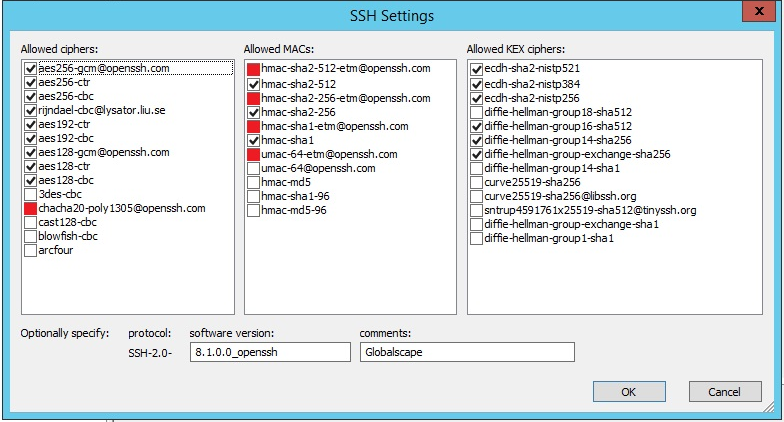
- In the administration interface, on the Server > Security tab, next to SFTP security settings, click Configure. The SSH Settings dialog box appears.
- SSH Settings shows allowed ciphers, allowed MAC algorithms, and allowed KEX ciphers. Only the selected choices are applied.
- To be safe, choose either CBC or Mac ETM Algorithms; do not combine CBC and Mac ETM algorithms.
- Clear the check boxes of the CHACHA, CBS, and ETM options.