THE INFORMATION IN THIS ARTICLE APPLIES TO:
QUESTION
What do the error codes in EFT.log mean?
ANSWER
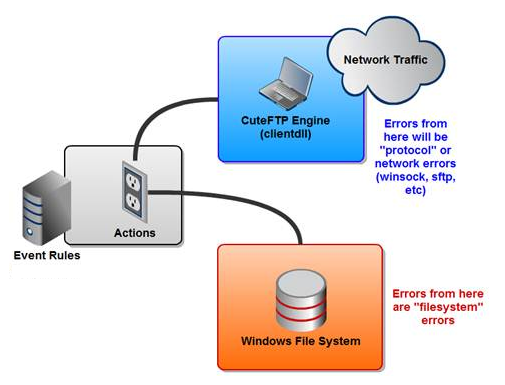
Error codes recorded in EFT.log are context-dependent and vary based on the operation being performed at the time the error occurred. EFT logs may contain a combination of:
-
Windows system error codes
-
Network and socket error codes
-
Protocol-specific error codes (FTP, SFTP, HTTP/S)
For example, when running a Folder Monitor rule, an error such as:
is a standard Windows system error that indicates Access is denied, typically caused by insufficient permissions for the EFT service account.
To interpret error codes found in EFT.log:
-
Windows system error codes
Refer to Microsoft documentation for detailed descriptions of standard Windows error codes.
-
Socket, protocol, and SFTP-related errors
Refer to the online help documentation for your version of EFT, which includes protocol-specific error information.
Because the same numeric error code can have different meanings depending on the context, always review the surrounding log entries to determine which operation was being performed when the error occurred.